Getting Started
Launch Oracle4Grid
To execute in manual mode, from root folder, type:
pipenv run python -m main -d 0 -f "oracle4grid/ressources/actions/rte_case14_realistic/test_unitary_actions.json" -e "data/rte_case14_realistic" -c 0
- –debug | -d int
if 1, prints additional information for debugging purpose, but also serializes some result files in output folder (see dedicated chapter Results) If 0, doesn’t print detailed info
- –file | -f string
File path to a json file containing atomic actions to be played. See dedicated chapter Atomic actions
- –env | -e string
Path to directory containing the grid2op environment and its chronics
- –chronic | -c
Name (string) or id (int) to the episode we want to consider. By default, the first available chronic will be chosen. Oracle4Grid only runs for one episode.
- –agent_seed | -as
Agent seed to be used by the grid 2op runner. By default, None is considered.
- –env_seed | -es
Environment seed to be used by the grid 2op runner. By default, None is considered.
See Algorithm Description section to learn more about the workflow and results.
Atomic actions
Oracle requires a base of atomic actions which are provided in .json format. These unitary elements plays the role of action “bricks” that will be combined by Oracle to build more consistent actions on the grid.
As a limitation, two types of atomic actions are handled, each one having a standard format:
- An atomic action which impact one substation topology - i.e. setting buses of assets (lines origins, lines extremities, generators, loads)
{"sub": {"1": [{"lines_id_bus": [[0, 2], [2, 2]], "loads_id_bus": [[0, 2]], "gens_id_bus": [[0,2]]}}
- An atomic actions that disconnects one line
{"line": {"4": [{"set_line": -1}]}}
A user-friendly notebook is provided to help the user defining atomic actions and visualize their impact on the grid. See oracle4grid/core/actions_utils/Atomic_Actions_Helper.ipynb
2 other formats can already be parsed and it is possible to develop new parsers following the API. See more details in section Action parsing
Configuration
Configuration is made through oracle4grid/ressources/config.ini
max_depth - Maximum number of atomic actions to combine for creation of oracle actions
max_iter - Maximum timestep to simulate in the episode
reward_significant_digit - Number of significant digits for reward, don’t write value if you don’t want to truncate and the parameter will be None
nb_process - Number of threads the computation engine is allowed to use
best_path_type - shortest or longest - Decides whether oracle should find the path that maximizes or minimizes the reward
n_best_topos - Number of topos in best path to compute in indicators
Results
Oracle returns 2 different action path that respect the game rules allowed transitions (see Constants section)
The best path. Two level of representation are returned: a list of OracleAction and a list of Grid2op.Action
The best path without overload, with the two same levels of representation
When printed, the OracleActions have a simple representation. For example sub-1-2_line-4-3 combines the second and third unitary actions that impacts respectively substation 1 and line 4 The best path can look as below

Additionaly, a Pandas.DataFrame with interesting cumulated rewards for various standard behaviour (indicators) is returned in order to give context and boundaries to the performance of Oracle but also your agents.
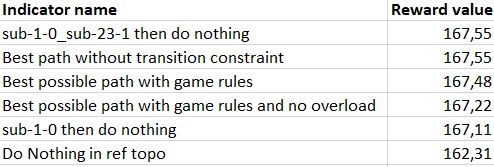
See Didactic example section for more details about the results through a simple use case. In debug mode, more info will be printed and serialized.
Agent replay
An agent is provided in order to replay the best path (oracle4grid/core/agent/OracleAgent.py) To facilitate the agent, oracle4grid replays it once in order to check in real game rules condition
if a game over occurs (it also prints number of survived timesteps)
if the expected cumulated reward is obtained (it could not be the case if overloads occur in path and leads to null rewards)
Two types of warning can be returned accordingly

Constants
in addition to config.ini, there is a constant API available for easy local overrides of some common behaviors / implementations. This API can be used in two ways :
Local override : You may change the file itself to experiment with the different parameters of the API. See the comments in the file.
API override : The main function (load_and_run() and oracle()) of the Oracle allow for a constants argument that you can pass. It is usually an instance of a sub-class of the default implementation
It can be found in oracle4grid/core/utils/constants.py
You can currently modify three main features in the constants:
The Grid2op Backend used for simulations
The main reward and additional other rewards to be used
The game rules in simulation, in graph computation and in replay conditions
Tests
To launch the test suite:
pipenv run python -m pytest --verbose --continue-on-collection-errors -p no:warnings